A gradebook for teachers of any grade, from kindergarten through twelfth.
It works offline, keeps every score in a file you own, and never asks you to make an account.
Install it or open the web app. Hit Try a sample class on the first screen to poke around a full class without typing anything in.
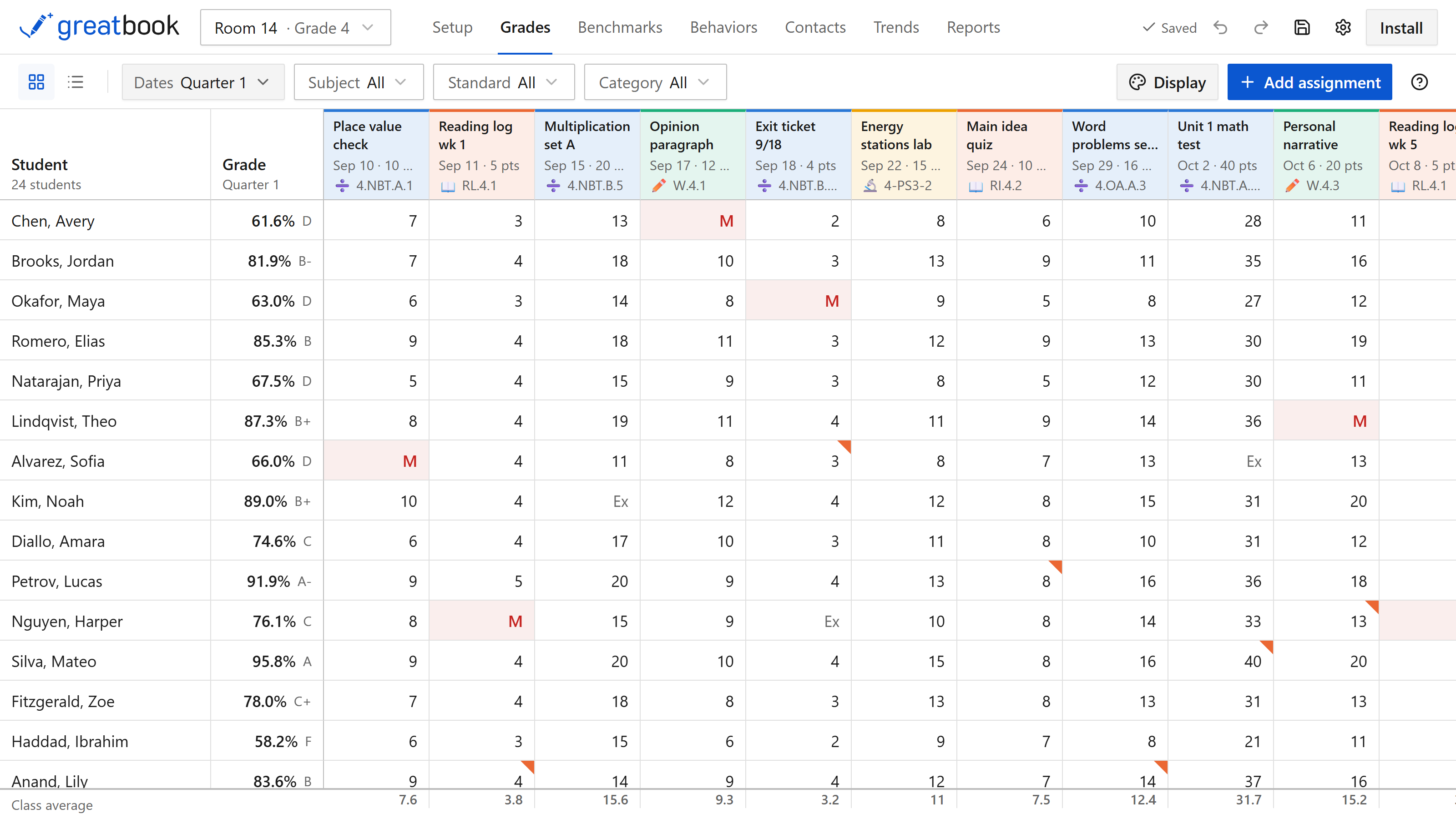
Everything it does
Greatbook is a grid of students against assignments, and everything else works up from what you type into it.
- Assignments and grades entered from the keyboard, with arrow keys, missing, excused and late
- Score out of points, as a percent, as a level, or done and not done
- Course grades by total points or by weighted categories
- Your own levels, letter cut-offs, late penalty and missing-work rule
- Report cards with the course grade, every standard under it, and the grade you decide
- Standards on every assignment, and more than one where a project covers more than one
- Filter the grid to one standard, one subject, one category or one stretch of dates
- Rosters pasted in whole, or brought over from a Google Classroom download
- Common Core Math, Common Core English Language Arts and NGSS built in, plus CSV and CASE import
- Trends for one student or the whole class, with the class average behind
- Benchmarks, behavior records and a contact log, switched on per class
- Cells shaded by how well students did, so a bad column shows before you read it
- A comment bank, so last term's wording is there when you need it again
- Drop the lowest few in a category, and flag work as extra credit or out of the grade
- Copy and paste whole blocks of scores, comment on any one of them, and undo all of it
- As many report layouts as you like, each covering its own dates, laid out for printing
- Classes saved as templates, to reuse next year or hand to a colleague
- No account, and no server holding your class
- Works with the Wi-Fi off
- Every score in a file you own
- Backups taken for you, dated, into a folder you pick
Each of those is covered below.
Marking
Students down the side, assignments across the top. You never need the mouse: arrow keys move around, typing enters a score, Enter drops to the next student.
Type m for missing, x to excuse a piece of work, and stick an l after a score for late work. A whole stack of papers goes in about as fast as you can read them.
An assignment can be scored:
- Out of points
- As a percent
- As a level
- As done and not done
You can also flag one as extra credit, or keep it out of the grade entirely, comment on any single score, copy and paste whole blocks of scores, and undo anything you have just done.
Standards
Tag each assignment with the standards it covers. One project can carry three of them.
Filter the grid down to a single standard and you can see how all 24 students are doing on that one thing.
Cells are shaded by how well students did, so a column that went badly jumps out before you read a number.
Report cards
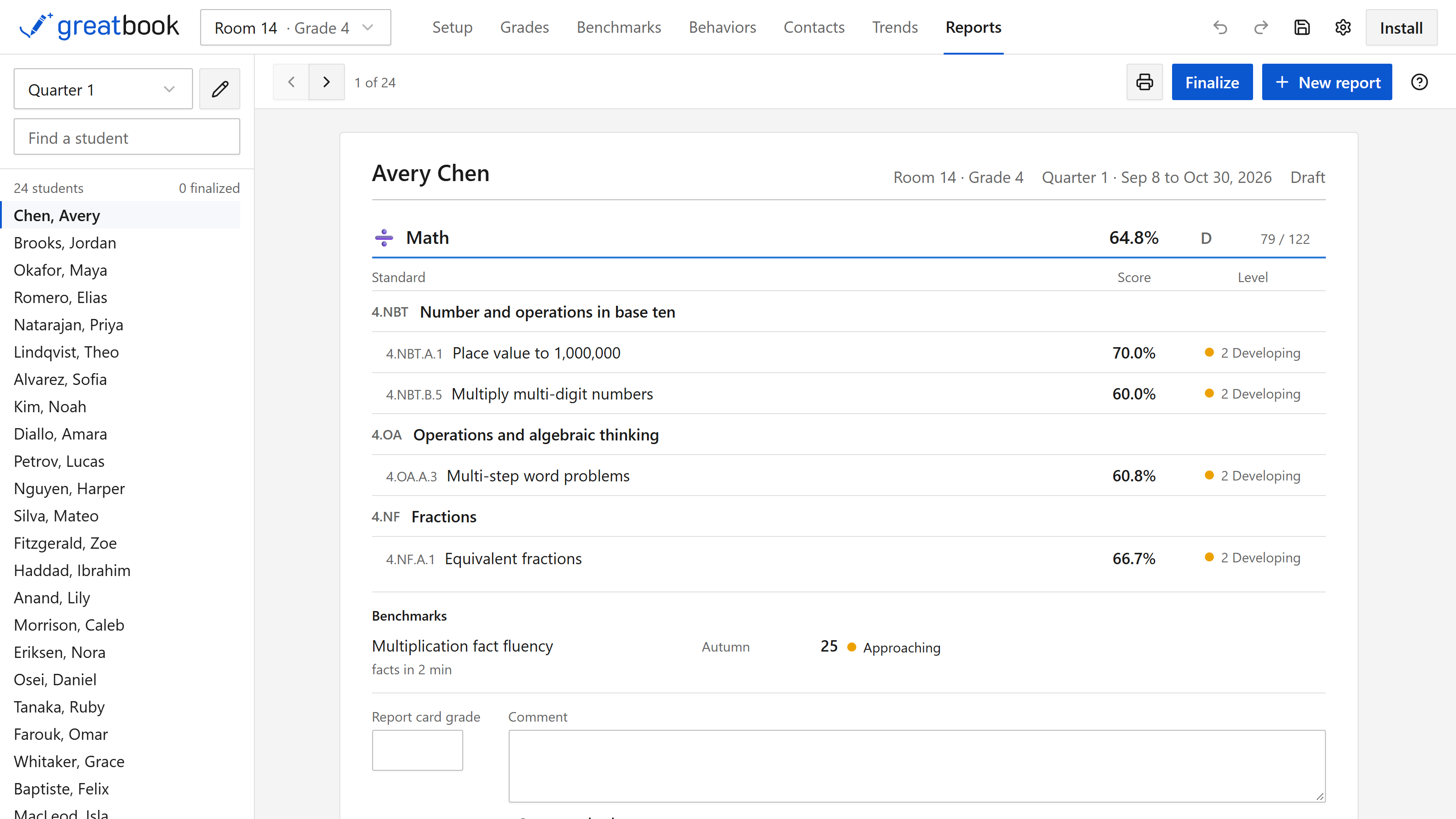
Every student gets a page showing the course grade their assignments add up to, and underneath it, how they are doing on each standard. So you can see a B-minus and, right under it, that the B-minus is two strong standards and one they have not got yet.
Then you type in the grade you are actually giving, which the app never calculates for you, plus a comment. Comments you write every term can be saved and dropped in again.
Build as many reports as you like, each covering its own dates, and tick what goes on the card. Make a short one for parents and a fuller one for an IEP meeting.
They print properly, with ruled lines for a signature and a date. Finalize a card and its grades are frozen, so entering a late assignment next week will not change what you already sent home.
Trends
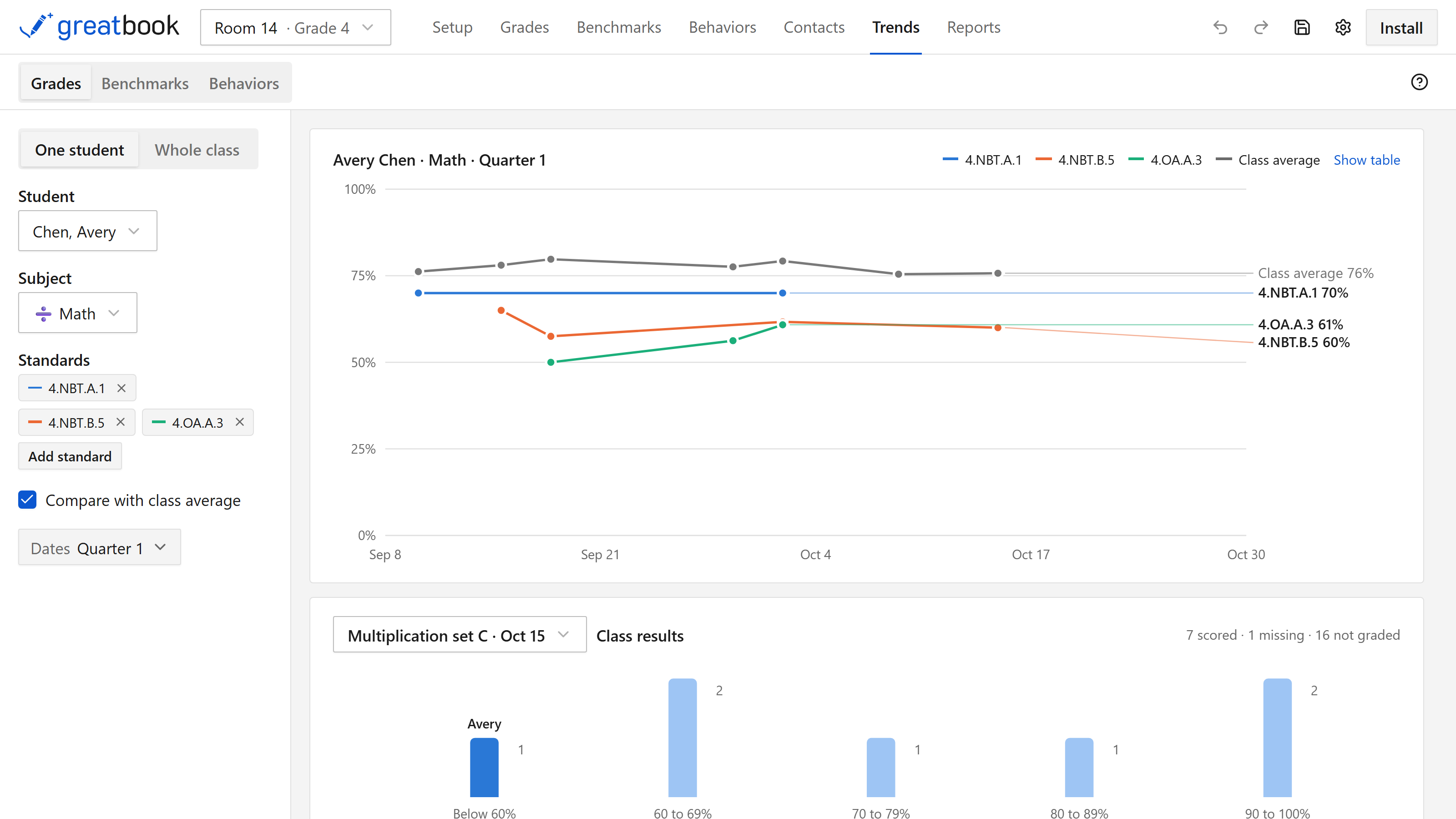
See whether scores are climbing or sliding over any stretch of the year, for one student or the whole class.
Draw a student against the class average, chart up to four standards at once, or look at how the class was spread across a single assignment. Every chart has a button that shows you the numbers behind it.
Benchmarks, behavior and contacts
Three tabs you can turn on for a class in Setup, and leave off otherwise.
Benchmarks hold the tests you run a few times a year — reading fluency, multiplication facts in two minutes. Set your own bands with a color each, and a raw score turns into approaching or met on its own. They never touch the course grade.
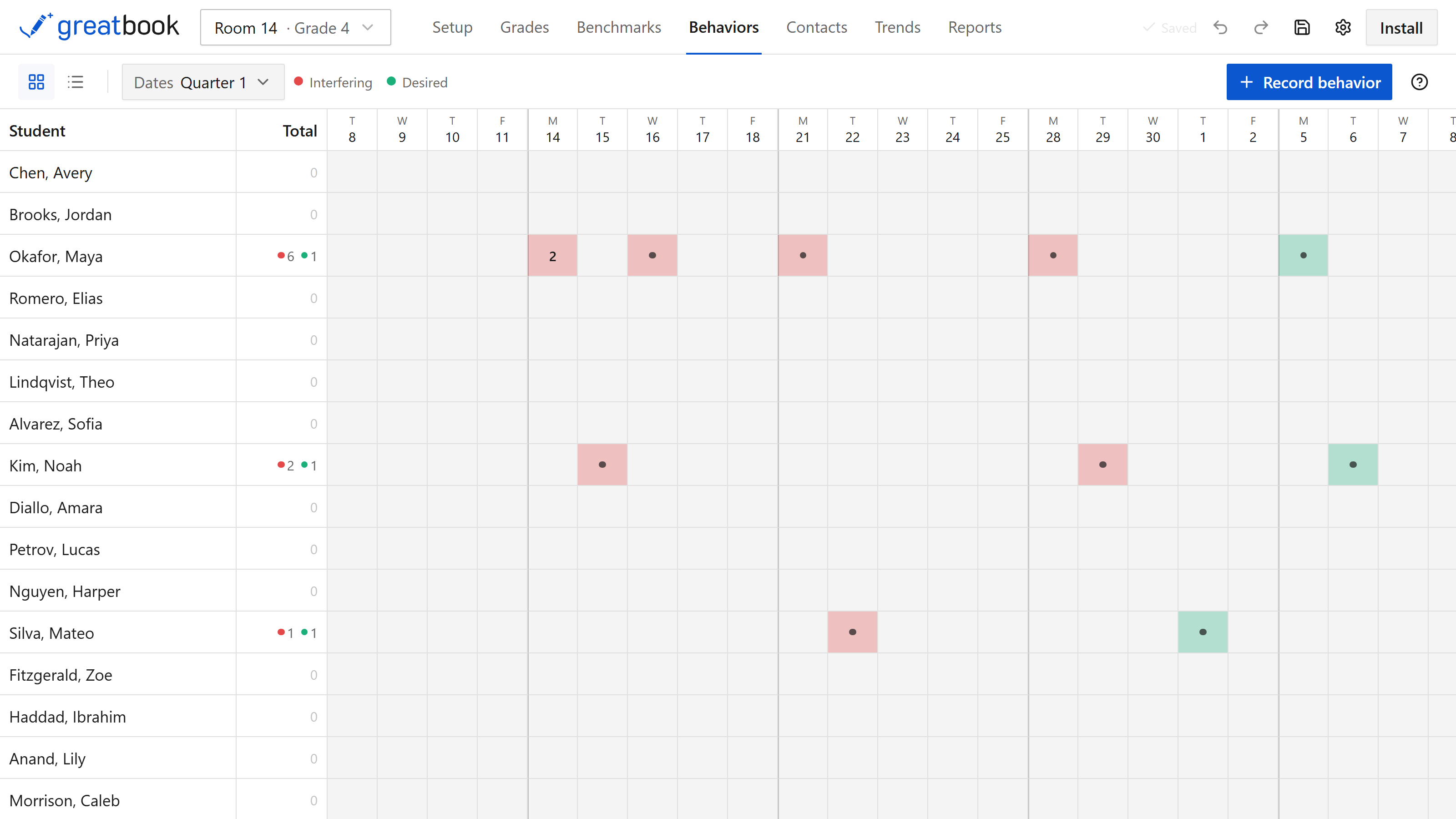
Behaviors is a grid of students against school days, so you can log what happened and have something concrete in front of you at a conference or a referral. You pick the wording your school uses.
Contacts logs calls and emails home, with a Last column that tells you who you have not spoken to since October.
Grades worked out your way
Five things you decide, rather than the app deciding them for you:
- Total points, or weighted categories
- What missing work counts as
- What late work costs, as points or as a percentage
- Your own levels and letter grade cut-offs
- Dropping the lowest few scores in a category
As you set each one, the app shows it applied to a real score, so you can check the rule before any grade depends on it.
Or switch percentages off completely and mark everything in levels.
Starting the year without typing
There are four ways to fill a class without typing it in:
- Paste your whole roster at once
- Import a Google Classroom grades download, which brings the students, the assignments and the marks together
- Import standards: Common Core Math, Common Core English Language Arts and NGSS ship with the app, or bring your own from a CSV or a CASE package
- Open a class template you saved last year, or one a colleague sent you
An import shows you exactly what it will do first, and you decide which version wins when a mark clashes with one of yours. Nothing is ever deleted by one, and you can trim a standards set down to just your grade on the way in.
Your work stays yours
You do not make an account, and there is no server anywhere holding your gradebook. Your students' names and scores sit on your own computer and stay there.
There is no save button, because every edit is written to the file the moment you make it. Dated backups go to a folder you pick.
It runs as a proper app on Windows and macOS, and installs straight from this page on a Chromebook.
What it costs
Greatbook is free, and everything above is in the free version.
You pay only for one thing: keeping a copy of your gradebook in your own Google Drive, so you can pick it up on another computer. That is $14.99 once, with no subscription. Here is what it can and cannot see.
If you do not need that and would still like to put something in, there is a page for supporting the work.
Getting started
Install it, then skim the guide.
Where your work is kept covers backups, and is worth reading before you have a term's marking to lose. If something has gone wrong, try here.